

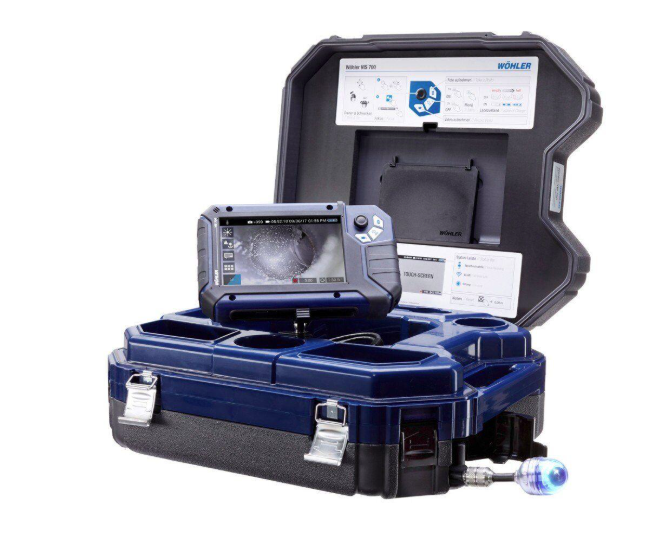
Using a borescope for engine inspections is only half the job. The other half is documenting what you see in a clear and useful way. Good images and videos help track wear, explain problems, and support repair decisions. They also make it easier to share findings with team members, managers, or customers.
If your documentation is messy or incomplete, even the best inspection loses value. Here is how to capture, save, and share borescope inspection media the right way.
Start With a Clear Inspection Plan
Before turning on the borescope, know what you are looking for. Are you checking for cracks, carbon buildup, corrosion, foreign object damage, or worn components? Having a goal keeps your images focused and useful.
Make a simple checklist of engine areas to inspect. This helps you avoid missing spots and keeps your documentation consistent across inspections. When every inspection follows the same structure, comparing results over time becomes much easier.
Clean the Lens and Adjust Settings
A dirty lens can ruin an otherwise perfect inspection. Before inserting the borescope, wipe the lens with a soft cloth designed for optics. Even a small smudge can blur fine details.
Next, adjust your camera settings. Set brightness and exposure so metal surfaces are not washed out. If your borescope allows manual control of light intensity, start low and increase gradually. Too much light can hide cracks and surface damage.
Use the highest practical resolution for both photos and videos. Higher resolution gives you better zoom capability later without losing detail.
Capture Wide Shots First
When you enter a new area of the engine, start with a wider view. This shows the overall condition and gives context for closer images. Think of it like taking a room photo before zooming in on a specific corner.
Wide shots help viewers understand where damage is located. Without them, close ups can be confusing. Someone reviewing your report later should be able to tell exactly which component they are seeing.
Move the scope slowly and steadily. Quick movements can blur the image and make the video hard to watch.
Then Take Close Up Detail Images
After the wide view, move closer to any area that looks worn or damaged. Fill most of the screen with the issue, but keep enough surrounding material visible for reference.
Take multiple photos from slightly different angles. Lighting and shadows can change how a defect appears. Having more than one image reduces the chance of misreading the condition.
If your borescope supports still image capture during video recording, use it. A video shows movement and position, while still images make it easier to highlight specific defects in reports.
Keep the Camera Steady
Shaky footage makes it hard to see fine details. Use gentle hand movements and brace your hand against a stable surface when possible. Some technicians rest their wrist or forearm on the engine frame for support.
If your borescope has image stabilization, turn it on. This feature helps smooth small movements and improves video quality.
When recording video, pause briefly at important areas. Holding the camera still for a few seconds gives viewers time to study the image.
Use Voice Notes or On Screen Labels
It is easy to forget what you were looking at after the inspection is done. Some borescopes allow audio recording during video. Use this to describe what you see in real time, such as “small crack on turbine blade near root.”
If audio is not available, take notes on paper or a mobile device as you inspect. Write down the file name and a short description of each issue. This makes report writing much faster later.
Some inspection software lets you add text labels directly to images. This is very helpful when sharing findings with people who were not present during the inspection.
Create a Consistent File Naming System
Random file names like IMG_001 or VID_23 are not helpful. Use a naming system that includes the date, engine ID, section inspected, and sequence number.
For example: 2026-01-Engine12-Combustor-01.jpg
This structure keeps files organized and searchable. Anyone on your team should be able to understand what the file contains just by reading the name.
Store photos and videos from each inspection in a dedicated folder. Inside that folder, you can create subfolders for different engine sections if needed.
Back Up Your Files Right Away
Inspection data is valuable. Losing it can mean repeating work or missing early signs of failure. As soon as the inspection is finished, transfer files from the borescope to a secure computer or server.
Use at least two storage locations. One can be a local drive and the other a cloud service or network server. Automatic backups are even better because they reduce the chance of human error.
Make sure access is controlled. Only authorized people should be able to edit or delete inspection files.
Organize Media Into a Clear Report
Raw files are useful, but a structured report makes your findings easier to understand. Choose the best images and short video clips that clearly show the condition of each area.
Arrange them in the same order as your inspection checklist. Add short captions that explain what the viewer is seeing and why it matters. For example, “Carbon buildup on injector tip, moderate level, monitor next inspection.”
Avoid overloading the report with too many similar images. Focus on clarity rather than quantity.
Highlight Changes Over Time
One of the biggest benefits of good documentation is trend tracking. When you inspect the same engine again, compare new images with older ones.
Place past and current photos side by side in your report when possible. This helps show whether a crack has grown or deposits have increased. Clear visual comparisons support better maintenance decisions and help justify repairs.
Share Files in Accessible Formats
When sending inspection results to others, use common file formats like JPEG for images and MP4 for videos. These formats open easily on most devices without special software.
If file sizes are large, use secure file sharing services rather than email attachments. Make sure the person receiving the files knows what each file contains by using your clear naming system and report captions.
Keep a master copy of all original files. Shared versions can be compressed, but you should always retain the highest quality originals for records.
Protect Sensitive Information
Engine inspections may involve equipment that belongs to clients or includes proprietary designs. Follow your company policies for data security.
Remove or blur any serial numbers or labels if required before sharing outside your organization. Use password protection on reports when needed, especially if they include detailed damage assessments.
Being careful with data builds trust and protects both you and your customers.
Build Good Habits
Strong documentation is about consistency. Clean lens. Good lighting. Wide shot. Close up. Clear file names. Secure storage. Simple report. When these steps become routine, your inspections become more professional and more valuable.
Over time, you will build a visual history for each engine. That history can reveal patterns, prevent failures, and support smarter maintenance planning.
Get Expert Help With Your Borescope Inspections
When you need reliable borescope equipment and expert guidance, the team at USA Borescopes can help you choose tools that make capturing and sharing inspection images simple and effective for any engine application. Their experience across industries means they understand real inspection challenges and can recommend practical solutions that fit your workflow. Reach out to them
About the Author
This guest post was written by an inspection and maintenance professional with hands on experience using borescopes in aviation and industrial environments. They focus on practical workflows, clear documentation, and helping teams turn visual inspection data into smart maintenance decisions that improve safety, reliability, and long term equipment performance.

Great insights in this post—it’s impressive how modern security setups blend reliability with user-friendly design, offering homeowners real peace of mind and easy monitoring across rural and urban spaces alike Wireless alarm installation Glasgow.
Great post—insightful and practical, offering useful perspectives for businesses evaluating server options and support. The discussion clarifies implementation steps and how to balance cost, performance, and reliability in real-world scenarios HPE Server distributor dubai.
I really appreciate this insightful post; it offers practical ideas that readers can apply right away, with a friendly tone and clear takeaways for anyone curious about evolving markets and partnerships Mimosa distributor Saudi Arabia.
As a reader, I appreciate practical insights and firsthand tips on selecting reliable gear, especially when blogs help compare features, warranties, and after-sales support in a friendly, approachable way Epson Printer Sellers Saudi Arabia.
I appreciated the thoughtful insights in this post and the practical examples shared. It’s refreshing to see balanced perspectives that help readers make informed decisions in evolving tech landscapes and secure networks confidently Cisco distributor Russia.
The post offers a thoughtful look at how reliable networks shape daily work and learning, highlighting practical tips and real-world experiences that make complex tech feel accessible and essential for everyone involved Cisco internet provider uae.
Great insights in this post. I appreciate how the topic covers practical impacts for businesses and IT teams while staying approachable for readers with varying levels of expertise Cisco distributor syria.
Great insights in this post—clear explanations, practical tips, and a balanced view that helps readers feel informed without overwhelm. A thoughtful reminder to compare options and consider long‑term value Dell Server distributor Russia.
I’ve found reliable local vendors who offer solid service and competitive pricing for enterprise gear, making it easier to upgrade critical infrastructure without hassle or delays, while keeping support accessible and responsive Dell Server Sellers Saudi Arabia.
Great insights shared here! It’s always inspiring to see how teams balance creativity with solid technical strategies, ensuring user needs drive every decision and delivering value with thoughtful, practical solutions app development company bangalore.
This post highlights smart ways businesses can streamline collaboration and customer interactions. A thoughtful approach to security, reliability, and scalable support really helps teams stay productive and connected in today’s fast-paced environment cloud communications australia.
I recently learned a lot about repairing devices and how proper replacements can extend a phone’s life. It’s reassuring to see guides that emphasize safety and quality parts for lasting results samsung s21 ultra screen replacement.
I’ve found hosting plans that balance cost and support well, making it easy to grow without sacrificing performance. Honest reviews and practical tips always help me compare features across providers best reseller hosting india.
I really enjoyed this post and appreciated the thoughtful take on how tech evolves ideas and inspires new conversations. The examples prompt curiosity without overwhelming the reader, which I value highly AI Historical Figures Chat.
Really helpful article, thanks for sharing practical tips on choosing reliable grills. I appreciate the balance of features and price considerations, and the friendly, straightforward tone makes it easy to compare options Gas Grills for Sale.
I really enjoyed this post and found the topic engaging, clear, and practical for anyone curious about woodworking tools and how precision helps achieve better finishes on intricate edges Curvilinear Edge bander.
Interesting post! I appreciate how practical ideas can streamline daily routines and reduce misplacement. A thoughtful approach to organisation often boosts focus, reduces stress, and helps everyone stay on track throughout the day student locker tracking system.
I appreciate thoughtful coverage on privacy and data control. This topic highlights how responsible data handling can build trust while protecting sensitive information. Clear guidance helps readers feel empowered to take action responsibly executive personal data removal service.
It's impressive to see how companies like Threatsys Technologies Pvt. Ltd. are setting new standards with the Best DPDP Audit Services in India. Ensuring data privacy and compliance is crucial in today's digital landscape, and such audits help businesses stay ahead by identifying vulnerabilities effectively. Truly a game-changer in technology-driven
Great insights on the latest security trends! If anyone is experiencing issues with their surveillance systems, searching for "CCTV repairs near me" can be a quick way to find reliable local technicians. Prompt repairs ensure your security setup remains effective and helps prevent any potential breaches. Thanks for sharing this
Pixel86 offers some of the best Monthly Website Packages I've come across. Their plans provide great flexibility and ensure your website stays updated with the latest technology. For anyone looking to maintain a strong online presence without hassle, these Monthly Website Packages are definitely worth considering.